
Settings overview

Last verified

4 min 54 sec video · Watch on YouTube
Video transcript

In this video, you'll learn how to use Settings in Better Cater to set your branding, your taxes, your service charge and gratuity, and the fees and templates you reuse.

Click your profile icon in the top right, then Settings. This is where you set up the business details we use across every event.

Think of Settings as the place you set your defaults once, so nobody retypes the same rates, terms, and fees on every event. The ones below the divider shape your company and its client documents.

You land on Business Location. It holds the name, phone number, email address, Tax ID, time zone, and address we use on proposals, invoices, and reports.

Add your logo so proposals and invoices look like they came from your business, not a generic template. Leave it empty and we print your business name.

Brand Color is used on document headings and the pages clients open online, so what you send looks consistent. Set your time zone and address, then Update Location.

Contract Templates are the terms you reuse on proposals: deposit rules, balance due dates, cancellation terms, venue access, or any policy a client agrees to.

The one marked Default starts a new proposal, and Edit opens the full editor. Use the wording your business requires, and check with your legal or tax advisor if you are unsure.

Note templates save reusable event notes. Internal notes are for your team: prep instructions, delivery details, kitchen reminders. Client-facing notes are what your client sees.

Service Charge & Gratuity holds the default percentages we add to a new event. Edit sets the Display Name your client reads, the Percentage, and the Tax Category.

Tax Exempt leaves the charge out of your tax calculation, and Add to every new event puts it on each new event. Tax rules depend on your location, so match how your business has to charge tax.

Tax Settings has three parts. Tax Rates are the percentages you charge, Service Zones group rates for an area, and Tax Categories control which items a rate applies to.

Your account starts with one Sales Tax rate, and the pencil sets the rate you charge. Once a rate has been used it locks, so a later change does not rewrite events you sent.

The categories stay open, and they decide what the rate is charged on. Here, Food and Alcohol are selected and Staffing & Labor is not. Yours should match the tax rules you follow.

Item Groups sort your catalog and event menus into sections like hors d'oeuvres, entrees, and desserts, and the arrows set the order your team sees. A proposal prints all of it under one Food and Beverage heading.

Additional Fees & Discounts are the reusable charges and credits you add to events: a delivery fee, a setup and breakdown fee, a rush fee, or a repeat client discount.

Add Fee opens a drawer. Percentage scales with the event total, Fixed amount is the same money every time, and Calculate on figures a percentage before tax or after tax.

Service charge eligible and Gratuity eligible control whether the fee counts when we calculate those, and Applies to Categories limits it to food or alcohol.

Calendar Feed gives you a subscription link for Google, Apple, or Outlook Calendar, so your events show up on the calendar you already check. The calendar video goes deeper.

That's Settings. Set your business details, branding, taxes, service charge, gratuity, templates, fees, and discounts once, so every event starts with the right defaults.

That's it. If you have a question, email us at support@bettercater.com. Thanks for watching.

What it does. Settings holds the details Better Cater uses on every event, from your business name and tax rate to the templates and fees you reuse. Set them once and every new event starts from them. It covers your logo and brand color, contract and note templates, service charge and gratuity, tax rates, item groups, reusable fees and discounts, and a calendar feed.

When you’d use it. Your first week, before the first proposal goes out, so it carries your name, logo, terms and tax rate. Later, when a rate or a policy changes, you change it here once instead of on each event.

How to open it

Click your profile icon in the top right, then Settings. It opens on Business Location. The links above the divider are your own profile, account, password and billing. The ones below it shape your business and the documents your clients see.
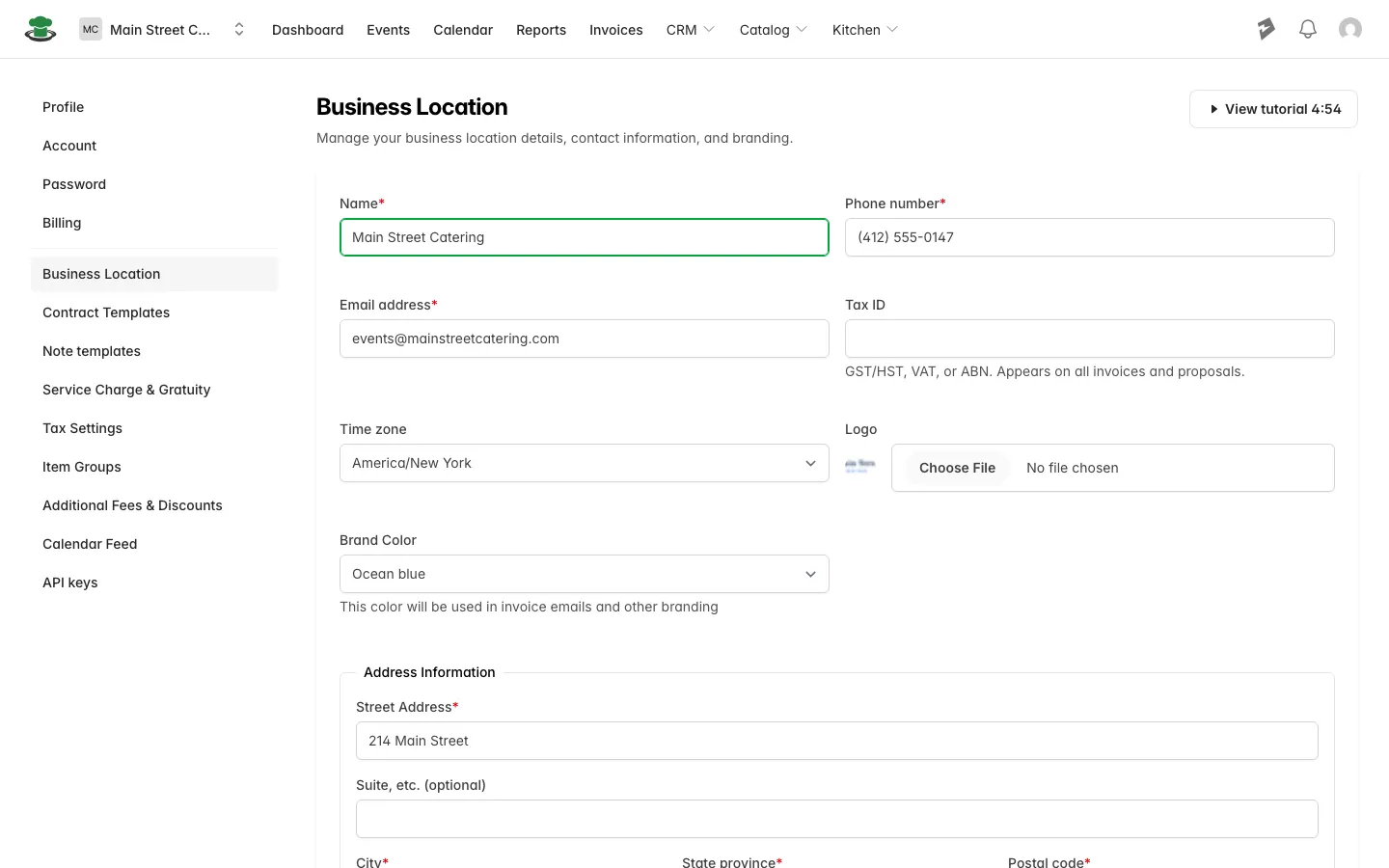
Settings, open on Business Location

What each page holds

Page What it holds
Business Location Your business name, phone number, email address, Tax ID, time zone and address, printed on proposals, invoices and reports. Your logo and brand color are here too, so you can put your logo on every document.
Contract Templates The terms a client agrees to on a proposal: deposit rules, balance due dates, cancellation terms, venue access. The template marked Default starts each new proposal.
Note templates Reusable event notes. Internal notes are for your team, such as prep instructions and delivery details. Client-facing notes go on the documents your client sees.
Service Charge & Gratuity The default percentages added to a new event, each with the display name your client reads, a tax category and a tax exempt option. Turn on “Add to every new event” and the charge is on each new event from the start.
Tax Settings Tax rates, service zones and tax categories, so you can set up the tax you charge before the first proposal.
Item Groups The sections your catalog and event menus sort into, such as hors d’oeuvres, entrees and desserts, in the order you choose. Use it to organize your menu into groups.
Additional Fees & Discounts Reusable charges and credits, such as a delivery fee, a setup and breakdown fee or a repeat client discount, as a percentage or a fixed amount. From an event you can add one to that event.
Calendar Feed A subscription link that lets you see your events in Google, Outlook or Apple Calendar.
API keys Keys that let other software read your account. Most caterers never need this page.

Good to know.

  • Once a tax rate has been used on an event it locks. To charge a different percentage from then on, add a new rate; events you already booked keep the rate they were booked with.
  • Item groups organize your catalog and your event menus. A proposal prints everything under one Food and Beverage heading.
  • The legal wording in contract templates is yours. Check it with your legal or tax advisor if you are unsure.

Did this answer your question?

See it in your own kitchen

The free trial starts with your real menu, your real prices, and your next real event.

30-day free trial · No credit card required · Rated 4.8 on Capterra

Send us a message

Ask us anything about Better Cater and we'll get back to you by email soon.

See how Better Cater works for your catering business

Tell us where to send it and we'll email you a short video walkthrough: how caterers replace spreadsheets, build events faster, send polished proposals, and see the profit on every job.

Watch it on your own time. No sales call required.