
What it does. Recording a payment logs money you’ve received against a booking, so the balance updates everywhere it’s shown: the Billing tab, invoices, and reports.
When you’d use it. A deposit check that arrives to hold the date, a card payment taken over the phone, or the final balance paid on the day of the event.
How to record it
- Open the event and go to the Billing tab.
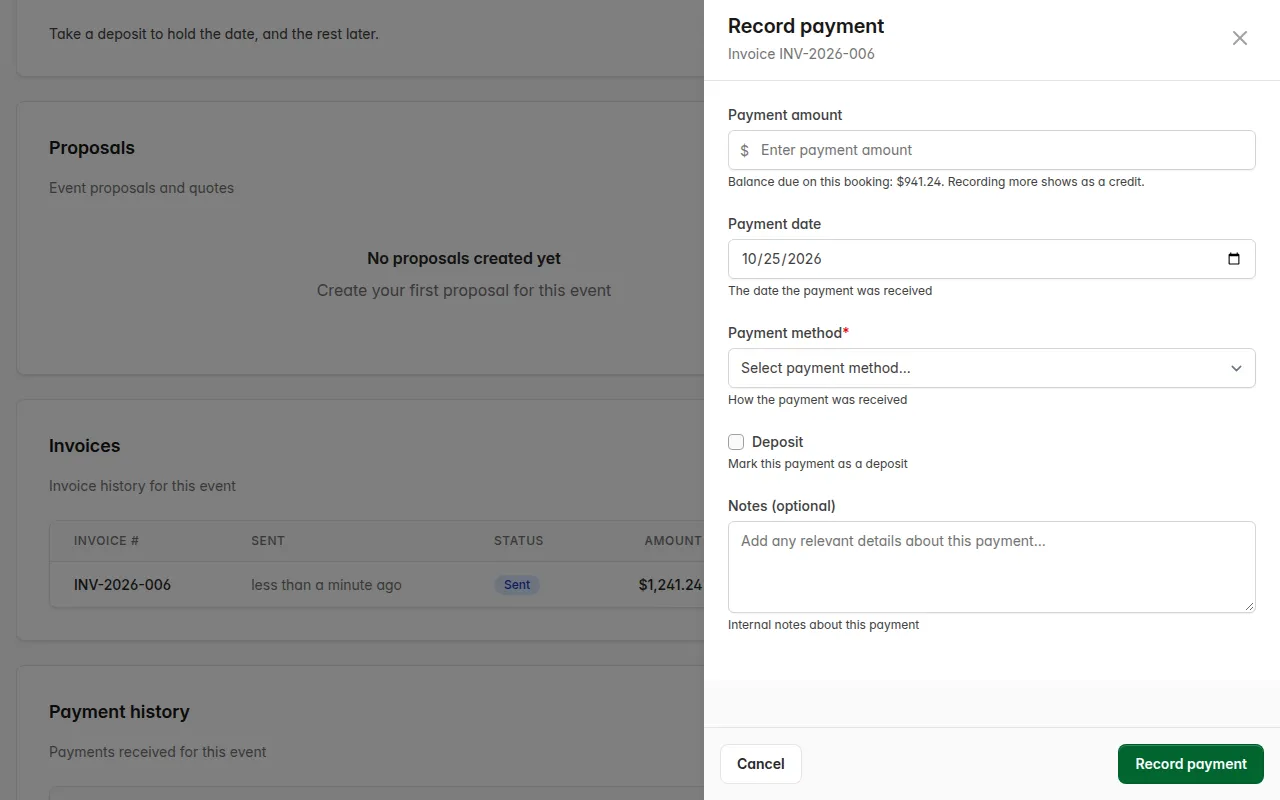
- Click Record payment. To tie the payment to a specific invoice, click the payment icon on that invoice’s row instead; the drawer then shows the invoice number and its balance.
- Enter the Payment amount. The balance due shows underneath as a reference; entering more than that shows as a credit.
- Check the Payment date. It starts today.
- Pick a Payment method: Cash, Check, Credit card, Bank transfer, or Other.
- Check Deposit if this is a deposit rather than a payment toward the balance.
- Add Notes if you want a record of a check number or similar.
- Click Record payment.
What you’ll see. The payment appears in Payment history with its date, the invoice it’s tied to (if any), amount, method, and notes. The booking’s paid-to-date and balance due update immediately everywhere they’re shown.

Good to know.
- A payment doesn’t need an invoice. Money that arrives before any invoice exists, like a deposit taken over the phone to hold a date, still records and counts toward the balance.
- Marking a payment as a deposit is a label, not a different kind of transaction. It shows “(deposit)” next to the date so you can tell it apart later, but it counts toward the balance the same way a regular payment does.
- Entries are never deleted, only voided. The trash icon on a payment row voids it; it stays visible with a Voided tag and stops counting toward the balance.